

Hexo 使用 Github Actions 自动发布至 Github Pages 时,生的 html 页面空白?
s609926202 2020-11-22 15:06:25 +08:00 1823 次点击这是一个创建于 1850 天前的主题,其中的信息可能已经有所发展或是发生改变。
以下是 hexo 配置文件_config.yml 部署配置项:
deploy: type: git repo: [email protected]:xx/xx.github.io.git branch: main 以下是.gitignore 文件内容:
.DS_Store Thumbs.db db.json *.log node_modules/ public/ .deploy*/ 以下是 Github Actions 配置文件:
name: CI on: push: branches: - main jobs: build: runs-on: ubuntu-latest # 在最新版的 Ubuntu 系统下运行 steps: - name: Checkout # 将仓库内 master 分支的内容下载到工作目录 uses: actions/checkout@v1 # 脚本来自 https://github.com/actions/checkout - name: Use Node.js 10.x # 配置 Node 环境 uses: actions/setup-node@v1 # 配置脚本来自 https://github.com/actions/setup-node with: node-version: "10.x" - name: Setup Hexo env env: ACTION_DEPLOY_KEY: ${{ secrets.HEXO_DEPLOY_PRI }} run: | # set up private key for deploy mkdir -p ~/.ssh/ echo "$ACTION_DEPLOY_KEY" | tr -d '\r' > ~/.ssh/id_rsa # 配置秘钥 chmod 600 ~/.ssh/id_rsa ssh-keyscan github.com >> ~/.ssh/known_hosts # set git infomation git config --global user.name 'xx' git config --global user.email '[email protected]' # install dependencies npm install -g hexo-cli npm install - name: Deploy run: | hexo clean hexo generate hexo deploy # 执行部署程序 Github Pages 主分支为 main 分支,也只有这一个分支。但是 push Hexo 到 Github,自动部署后推送到 xx.github.io 仓库的 html 内容却为空,本地 hexo server 后预览正常。
请勿需要如何改进下,可以实现正确的自动部署?
 | 1 young1lin 2020-12-03 09:39:10 +08:00  1 1 name 没有,email 没有,repo 也填错了是 https: 开头的。 [正确的样例](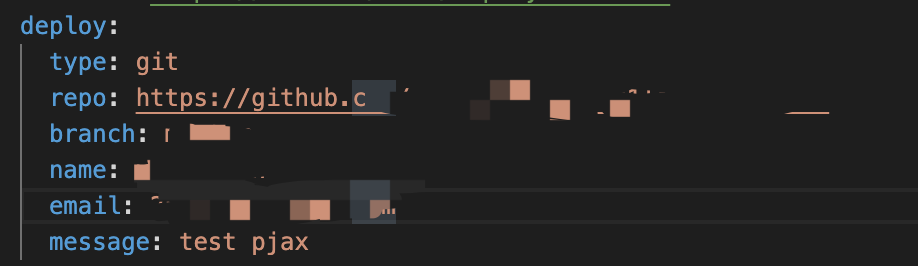) 你该好好看看官网的说明,还有检查 deploy key 有没有设置,hexo s 本地是否运行正常。 |
 | 2 s609926202 OP @young1lin 问题找到了,是由于主题是 git clone 下来的,主题目录下生成了.git 目录,导致和 hexo 根目录下.git 冲突了,commit 时没有把主题 push 上去导致的。 谢谢回答! |
 Select Language