

这是一个创建于 801 天前的主题,其中的信息可能已经有所发展或是发生改变。
腾讯云轻量服务器 3 周年刚过,买买买完后,发现手里又多了好几台轻量服务器,拿来干什么还没想好,那就先来个“分布式吃灰”吧。
环境要求
- 所有节点须为全新安装的Debian11/12或Ubuntu22.04操作系统
- 脚本使用了腾讯云的 metadata 获取 IP ,所有节点部署在腾讯云上不同的地域( CVM 、Lighthouse 均可)
跨云集群请参考本站另一篇文章:跨云多地域组建 Kubernetes 集群(k3s)
使用的组件
- K3s 一个轻量级的 Kubernetes 发行版,专为生产环境而设计
- Flannel 一个虚拟网络层,用于为容器化工作负载创建网络隔离和通信
- WireGuard 一种轻量级、高性能、安全的虚拟专用网络( VPN )协议,旨在提供安全的通信
- Flannel-WireGuard Flannel 网络插件的一种后端,使用 WireGuard 加密和隧道技术来保护网络通信
购买并配置 Lighthouse 服务器
Lighthouse 是腾讯云推出的一款轻量应用服务器产品,它提供了高性价比、高可用性、高安全性和高灵活性的云端计算服务。具体信息参阅官方文档:轻量应用服务器概述。
为了部署 Kubernetes 集群,我们需要至少 2 台轻量应用服务器,并配置好相关的环境和依赖。购买步骤参见官方文档:快速创建 Linux 实例,操作系统选 Debian 或 Ubuntu 最新版本。
在腾讯云控制台设置防火墙
参考下面的列表在腾讯云控制台设置防火墙规则。若无需精细控制的,可以设置为允许所有节点间 TCP/UPD 协议的全部端口互访。
| 协议 | 端口 | 源 | 目标 | 描述 |
|---|---|---|---|---|
| TCP | 6443 | 子节点 | 主节点 | Kubernetes API Server |
| TCP | 10250 | 所有节点 | 所有节点 | Kubelet 指标收集 |
| UDP | 51820 | 所有节点 | 所有节点 | Flannel WireGuard |
| TCP | 5432-9876 | 所有地址 | 所有节点 | 自定义的 Node Port |
| TCP | 80,443 | 所有地址 | 所有节点 | Web 服务才需要 |
部署 K3S 主节点
下面这段代码在主节点服务器上执行,注意替换SERVER_TOKEN为一个不少于 32 个字母的随机字符串。
apt update apt install -y wireguard echo "net.ipv4.ip_forward = 1" >/etc/sysctl.d/ip_forward.conf sysctl -p /etc/sysctl.d/ip_forward.conf export SERVER_TOKEN=r83nui54eg8wihyiteshuo3o43gbf7u9er63o43gbf7uitujg8wihyitr6 export PUBLIC_IP=$(curl -Ls http://metadata.tencentyun.com/latest/meta-data/public-ipv4) export PRIVATE_IP=$(curl -Ls http://metadata.tencentyun.com/latest/meta-data/local-ipv4) export INSTALL_K3S_SKIP_DOWNLOAD=true export DOWNLOAD_K3S_BIN_URL=https://github.com/k3s-io/k3s/releases/download/v1.28.2%2Bk3s1/k3s if [ $(curl -Ls http://ipip.rehi.org/country_code) == "CN" ]; then DOWNLOAD_K3S_BIN_URL=https://ghproxy.com/${DOWNLOAD_K3S_BIN_URL} fi curl -Lo /usr/local/bin/k3s $DOWNLOAD_K3S_BIN_URL chmod a+x /usr/local/bin/k3s curl -Ls https://get.k3s.io | sh -s - server \ --cluster-init \ --token $SERVER_TOKEN \ --node-ip $PRIVATE_IP \ --node-external-ip $PUBLIC_IP \ --advertise-address $PRIVATE_IP \ --service-node-port-range 5432-9876 \ --flannel-backend wireguard-native \ --flannel-external-ip 部署 K3S 子节点
下面这段代码在子节点服务器上执行,注意替换SERVER_TOKEN为和主节点相同的随机字符串,SERVER_IP为主节点的公网 IP 地址(在主节点执行命令curl -Ls http://metadata.tencentyun.com/latest/meta-data/public-ipv4即可获取)。
apt update apt install -y wireguard echo "net.ipv4.ip_forward = 1" >/etc/sysctl.d/ip_forward.conf sysctl -p /etc/sysctl.d/ip_forward.conf export SERVER_IP=43.129.195.33 export SERVER_TOKEN=r83nui54eg8wihyiteshuo3o43gbf7u9er63o43gbf7uitujg8wihyitr6 export PUBLIC_IP=$(curl -Ls http://metadata.tencentyun.com/latest/meta-data/public-ipv4) export PRIVATE_IP=$(curl -Ls http://metadata.tencentyun.com/latest/meta-data/local-ipv4) export INSTALL_K3S_SKIP_DOWNLOAD=true export DOWNLOAD_K3S_BIN_URL=https://github.com/k3s-io/k3s/releases/download/v1.28.2%2Bk3s1/k3s if [ $(curl -Ls http://ipip.rehi.org/country_code) == "CN" ]; then DOWNLOAD_K3S_BIN_URL=https://ghproxy.com/${DOWNLOAD_K3S_BIN_URL} fi curl -Lo /usr/local/bin/k3s $DOWNLOAD_K3S_BIN_URL chmod a+x /usr/local/bin/k3s curl -Ls https://get.k3s.io | sh -s - agent \ --server https://$SERVER_IP:6443 \ --token $SERVER_TOKEN \ --node-ip $PRIVATE_IP \ --node-external-ip $PUBLIC_IP 验证集群
kubectl get node kubectl top node kubectl get pods -A 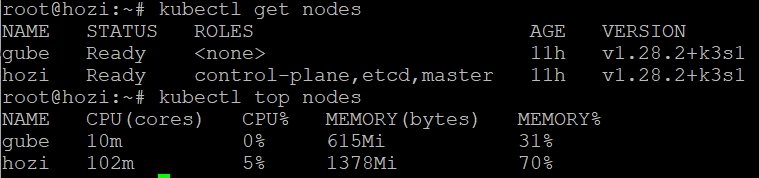
 | 1 julyclyde 2023-10-11 14:27:52 +08:00 是从公网相连的嘛? |
 | 2 arloor 2023-10-11 16:01:34 +08:00 @julyclyde 是的,可以看 k8 的官方文档: https://docs.k3s.io/installation/network-options#distributed-hybrid-or-multicloud-cluster 是使用 wireguard 实现的公网互联 |
 | 3 E1n 2023-10-11 21:22:47 +08:00 43.129.195.33 这个是 wireguard 的公网 IP 吗? |
 | 4 PluginsWorld 2023-10-11 22:56:56 +08:00 有安装 dashboard 的教程吗 |
| 5 PluginsWorld 2023-10-14 17:44:32 +08:00 是用来阿里云的 注册集群来管理。方便了很多。每个月集群的保留成本约 90.25 https://discuss.plugins-world.cn/post/4E2CTwvv |
 | 6 panisertoller OP @E1n 主节点外网 IP ,这里只是用来演示的测试机 IP |
| 7 panisertoller OP @PluginsWorld 可参考作者另一篇文章 https://www.rehiy.com/post/393/ |
| 8 panisertoller OP |
| 9 PluginsWorld 2023-10-15 13:17:53 +08:00 @panisertoller 感谢感谢。通过你的文章,我成功创建了 dashboard 。可以做到节约注册集群的费用了。https://discuss.plugins-world.cn/comment/kEc9G9yf |
| 10 PluginsWorld 2023-10-15 13:21:49 +08:00 跨网互联,遇到了一个多 master 无法加入的问题。目前还不知道咋解决 |
| 11 PluginsWorld 2023-10-15 13:46:41 +08:00 @panisertoller 大佬知道怎么在 k3s 上创建 serverless 环境吗,我想学习研究一下。 |
 Select Language