

这是一个创建于 2938 天前的主题,其中的信息可能已经有所发展或是发生改变。
我现在项目,前端使用 vue 做页面,后端使用 python
- npm run build 后无法显示背景图片(背景图片使用 CSS 写在模板的
style标签里面的)
2.使用 axio 请求后端无法将 cookie 设置到浏览器,网上看了一圈方法都不行,withCredentials=true也设置了,但是提示我错误
Failed to load http://localhost:8088/g: The 'Access-Control-Allow-Origin' header has a value 'http://localhost:8088' that is not equal to the supplied origin. Origin 'http://localhost:8080' is therefore not allowed access. 后端设置:
self.set_header('Access-Control-Allow-Credentials', True) self.set_header("Access-Control-Allow-Origin", "http://localhost:8088") self.set_header("Access-Control-Allow-Headers", "x-requested-with") self.set_header('Access-Control-Allow-Methods', 'POST, GET, OPTIONS') 怎么才能解决呢?
第 1 条附言 2017 年 12 月 27 日
开始我cros没设置对,后来v友提示,应该修改cros,然后修改了之后,发现cookie根本没发送到服务端 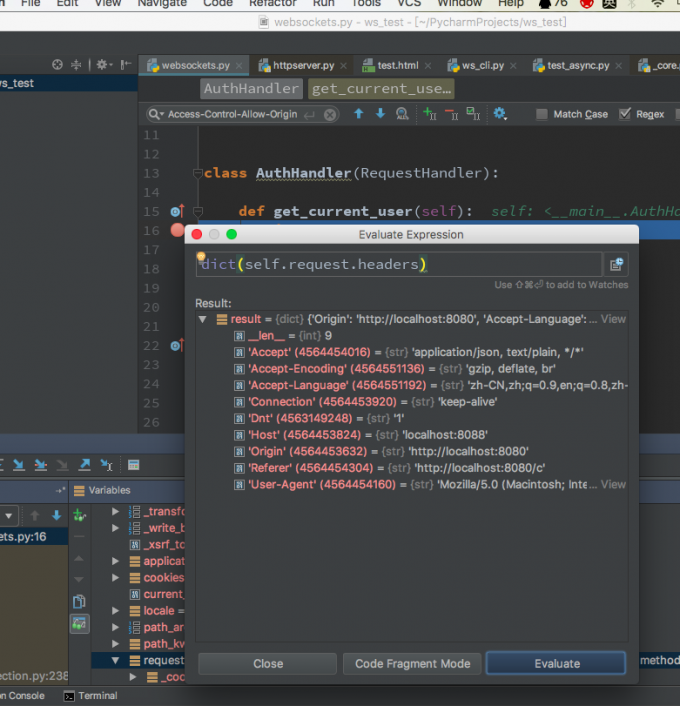
 | 1 greatonce 2017 年 12 月 26 日  1 1 Failed to load http://localhost:8088/g: The 'Access-Control-Allow-Origin' header has a value 'http://localhost:8088' that is not equal to the supplied origin. Origin 'http://localhost:8080' is therefore not allowed access. self.set_header("Access-Control-Allow-Origin", "http://localhost:8088") 你用 8080 访问,设置的是 8088 当然不允许访问 Origin 'http://localhost:8080' is therefore not allowed access. |
 | 2 ooTwToo 2017 年 12 月 26 日 哈哈哈,楼上真相了,不过你本地可以 Origin 为 * 呀 |
 | 3 SlipStupig OP @greatonce 我改了之后,后端依然收不到 cookie |
| 4 SlipStupig OP @ooTwToo 不行的,要发送 cookie |
 | 5 TabGre 2017 年 12 月 27 日 via iPhone 可以考虑 nginx 转发 |
 | 6 arfaWong 2017 年 12 月 27 日 开发环境可以用 webpack 的 proxyTable 将请求转发到后端 生产环境使用 nginx 将请求转发到后端 |
| 7 SlipStupig OP @arfaWong build 后背景图片没了 |
 | 8 guoyang 2017 年 12 月 27 日 1.首先 CORS,你的方案是没有错的,并且你的头如 1 楼所说 origin 要设置正确; 2.建议你现在 http://www.test-cors.org/中调通 CORS 的跨站测试; 3.前端也要开启 Credentials,VUE 的设置大概如下 import axios from 'axios' Vue.prototype.$http.defaults.withCredentials = true |
| 9 SlipStupig OP @guoyang cors 已经设置正确了,vue cert 我也设置了,目前依然报错: Failed to load http://localhost:8088/a: Redirect from 'http://localhost:8088/a' to 'http://localhost:8088/?next=%2Fa' has been blocked by CORS policy: No 'Access-Control-Allow-Origin' header is present on the requested resource. Origin 'http://localhost:8080' is therefore not allowed access. |
 | 10 twotiger 2017 年 12 月 27 日 登录后记得刷新页面 |
 | 11 rsl140 2017 年 12 月 27 日 axios.defaults.baseURL = 'http://localhost:8088'; |
 | 12 qiuyk 2017 年 12 月 27 日 @SlipStupig 哥你这端口还是没改呀哈哈哈 |
| 13 SlipStupig OP @qiuyk 我改了啊,没用啊 self.set_header('Access-Control-Allow-Credentials', 'true') self.set_header("Access-Control-Allow-Origin", "http://localhost:8080") self.set_header("Access-Control-Allow-Headers", "x-requested-with") self.set_header('Access-Control-Allow-Methods', 'POST, GET, OPTIONS') |
 | 14 MaxBear 2017 年 12 月 27 日 via Android 跨域了,用 node 代理一下 可以参考 http://www.bear777.com/blog/vue-vue-axios-vue-resource-vue |
 | 15 favicon 2017 年 12 月 27 日 webpack 的 proxyTable 里添加 cookieDomainRewrite: "localhost:8080" 不用谢 |
 | 16 jeremaihloo 2017 年 12 月 27 日 webpack 的 proxyTable 呀,楼上很多人都说了 |
 | 17 robinlovemaggie 2017 年 12 月 27 日 前后端分离为啥不考虑用 Token 做 Authrization? |
 | 18 469054193 2017 年 12 月 27 日 为什么进来变成黑色的了 |
 | 19 Terry05 2017 年 12 月 27 日 这里怎么成全黑了,看着好难受 |
 | 20 changkong 2017 年 12 月 27 日 css 图片路径的问题,vue-cli 是在 build->utils.js 里的`ExtractTextPlugin`改下`publicPath`, ``` if (options.extract) { return ExtractTextPlugin.extract({ use: loaders, publicPath: '../../', //注意: 此处根据路径, 自动更改 fallback: 'vue-style-loader' }) } else { return ['vue-style-loader'].concat(loaders) } ``` |
 | 21 yanqing07 2017 年 12 月 27 日 你收不到 cookie。也可能是 vue 的 ajax 发送时,没带 cookie。不一定是 py 的锅 |
| 22 SlipStupig OP @changkong 改了后给个个 warning Tip: built files are meant to be served over an HTTP server. Opening index.html over file:// won't work. |
 | 23 vivinBear 2017 年 12 月 27 日 1 main.js Axios.defaults.withCredentials = true build/utils.js if (options.extract) { return ExtractTextPlugin.extract({ use: loaders, fallback: 'vue-style-loader', publicPath: '../../' /// 加上这一行 }) } else { return ['vue-style-loader'].concat(loaders) } config/index.js 把 build 的 assetsPublicPath 的值改成"" 就可以了 |
| 24 vivinBear 2017 年 12 月 27 日 @SlipStupig 看我上面的,你的这些问题我都遇到过,并且都解决了 |
 | 26 moxiaonai 2017 年 12 月 27 日 楼上正解。样式问题是编译后的路径不对 跨域问题,服务端设置 cors。'Access-Control-Allow-Origin'必须为具体域名,不能为*。 前端 Axios.defaults.withCredentials = true,也必须允许接收跨域的 cookie  |
| 27 SlipStupig OP @vivinBear 能留个联系方式不,我还是没解决 |
| 28 SlipStupig OP @vivinBear 我那个背景图片地址是个 BASE64 编码地址:url(data:image/png;base64,iVBORw0KGgoAAAANSUhEUgAAACgAAAAoCAYAAACM/rhtAAAAGXRFWHRTb2Z0d2FyZQBBZG9iZSBJbWFnZVJlYWR5ccllPAAAAyRpVFh0WE1MOmNvbS5hZG9iZS54bXAAAAAAADw/eHBhY2tldCBiZWdpbj0i77u/IiBpZD0iVzVNME1wQ2VoaUh6cmVTek5UY3prYzlkIj8+IDx4OnhtcG1ldGEgeG1sbnM6eD0iYWRvYmU6bnM6bWV0YS8iIHg6eG1wdGs9IkFkb2JlIFhNUCBDb3JlIDUuNS1jMDE0IDc5LjE1MTQ4MSwgMjAxMy8wMy8xMy0xMjowOToxNSAgICAgICAgIj4gPHJkZjpSREYgeG1sbnM6cmRmPSJodHRwOi8vd3d3LnczLm9yZy8xOTk5LzAyLzIyLXJkZi1zeW50YXgtbnMjIj4gPHJkZjpEZXNjcmlwdGlvbiByZGY6YWJvdXQ9IiIgeG1sbnM6eG1wTU09Imh0dHA6Ly9ucy5hZG9iZS5jb20veGFwLzEuMC9tbS8iIHhtbG5zOnN0UmVmPSJodHRwOi8vbnMuYWRvYmUuY29tL3hhcC8xLjAvc1R5cGUvUmVzb3VyY2VSZWYjIiB4bWxuczp4bXA9Imh0dHA6Ly9ucy5hZG9iZS5jb20veGFwLzEuMC8iIHhtcE1NOkRvY3VtZW50SUQ9InhtcC5kaWQ6RTE3MUZDMzc2OUQwMTFFMzg3RkNENUMxREE0MjcxMzciIHhtcE1NOkluc3RhbmNlSUQ9InhtcC5paWQ6RTE3MUZDMzY2OUQwMTFFMzg3RkNENUMxREE0MjcxMzciIHhtcDpDcmVhdG9yVG9vbD0iQWRvYmUgUGhvdG9zaG9wIENTNS4xIE1hY2ludG9zaCI+IDx4bXBNTTpEZXJpdmVkRnJvbSBzdFJlZjppbnN0YW5jZUlEPSJ4bXAuaWlkOjE2OUUxRDlFNkZGMTExRTFBQjBCODVFNEE2MzdFRDhGIiBzdFJlZjpkb2N1bWVudElEPSJ4bXAuZGlkOkY1QTRERkEwNkZGMTExRTFBQjBCODVFNEE2MzdFRDhGIi8+IDwvcmRmOkRlc2NyaXB0aW9uPiA8L3JkZjpSREY+IDwveDp4bXBtZXRhPiA8P3hwYWNrZXQgZW5kPSJyIj8+5Xmx/AAAAF5JREFUeNrsztsJgFAMwNDWFyIiCOL+m1aXEOM1gfyfjIgzwOX9QQfudOBGB6504EIHznTgRAeOdOAgsHVgL1Dgy8BOoECBAp8FpkCBAj8MtObLqhIoUKDAPwMvAQYAhqcYrJBlYv8AAAAASUVORK5CYII=),跟我设置的完全不一样。我的配置 build/utils.js: // Extract CSS when that option is specified // (which is the case during production build) if (options.extract) { return ExtractTextPlugin.extract({ use: loaders, fallback: 'vue-style-loader', publicPath: '../../' /// 加上这一行 }) } else { return ['vue-style-loader'].concat(loaders) } config/index.js: build: { // Template for index.html index: path.resolve(__dirname, '../dist/index.html'), // Paths assetsRoot: path.resolve(__dirname, '../dist'), assetsSubDirectory: 'static', assetsPublicPath: "", /** * Source Maps */ productionSourceMap: true, // https://webpack.js.org/configuration/devtool/#production devtool: '#source-map', // Gzip off by default as many popular static hosts such as // Surge or Netlify already gzip all static assets for you. // Before setting to `true`, make sure to: // npm install --save-dev compression-webpack-plugin productionGzip: false, productionGzipExtensions: ['js', 'css'], // Run the build command with an extra argument to // View the bundle analyzer report after build finishes: // `npm run build --report` // Set to `true` or `false` to always turn it on or off bundleAnalyzerReport: process.env.npm_config_report } CSS: body { height: 100%; width: 100%; position: fixed; margin: 0; padding: 0; border: 0; vertical-align: baseline; background: url('../assets/login_bg.jpg') no-repeat; background-size: cover; -webkit-background-size: cover; -moz-background-size: cover; -o-background-size: cover; } |
| 29 vivinBear 2017 年 12 月 27 日 @SlipStupig 那这个就和前端没什么关系了吧,你现在还有什么问题,把错误贴出来 |
| 30 SlipStupig OP @vivinBear 背景图片无法显示啊 |
| 31 vivinBear 2017 年 12 月 27 日 @SlipStupig 你给我个联系方式,然后我试着帮你看看 |
 | 32 v2gg 2017 年 12 月 28 日 via Android @SlipStupig build 之后显示不出来可以 F12 看看是什么原因,可能是相对路径的锅 |
 Select Language