
linux 编译 curl 出错 - V2EX
V2EX = way to explore
V2EX 是一个关于分享和探索的地方
现在注册
已注册用户请  登录
Distributions
Ubuntu
Fedora
CentOS
中文资源站
网易开源镜像站
yunhui
V2EX    Linux

linux 编译 curl 出错

  •  
  •   yunhui 2015 年 11 月 12 日 11795 次点击
    这是一个创建于 3713 天前的主题,其中的信息可能已经有所发展或是发生改变。

    编译 curl make 死活不通过,唉
    执行参数如下,谢谢各位帮忙看看

    这一步一切正常
    root@debian:~/curl-7.45.0# ./configure --with-ssl
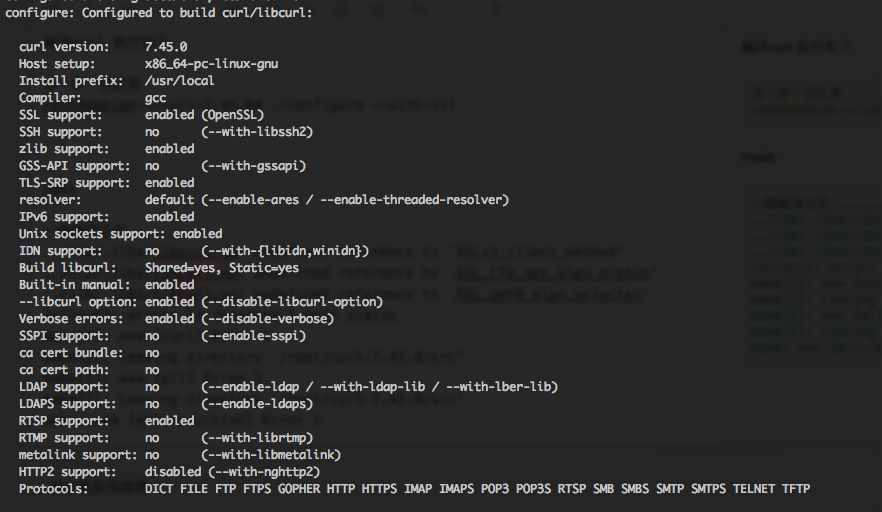
    图片描述

    make

    一顿编译之后 ...... 然后出错了 ../lib/.libs/libcurl.so: undefined reference to `SSLv2_client_method' ../lib/.libs/libcurl.so: undefined reference to `SSL_CTX_set_alpn_protos' ../lib/.libs/libcurl.so: undefined reference to `SSL_get0_alpn_selected' collect2: error: ld returned 1 exit status make[2]: *** [curl] Error 1 make[2]: Leaving directory `/root/curl-7.45.0/src' make[1]: *** [all] Error 2 make[1]: Leaving directory `/root/curl-7.45.0/src' make: *** [all-recursive] Error 1 
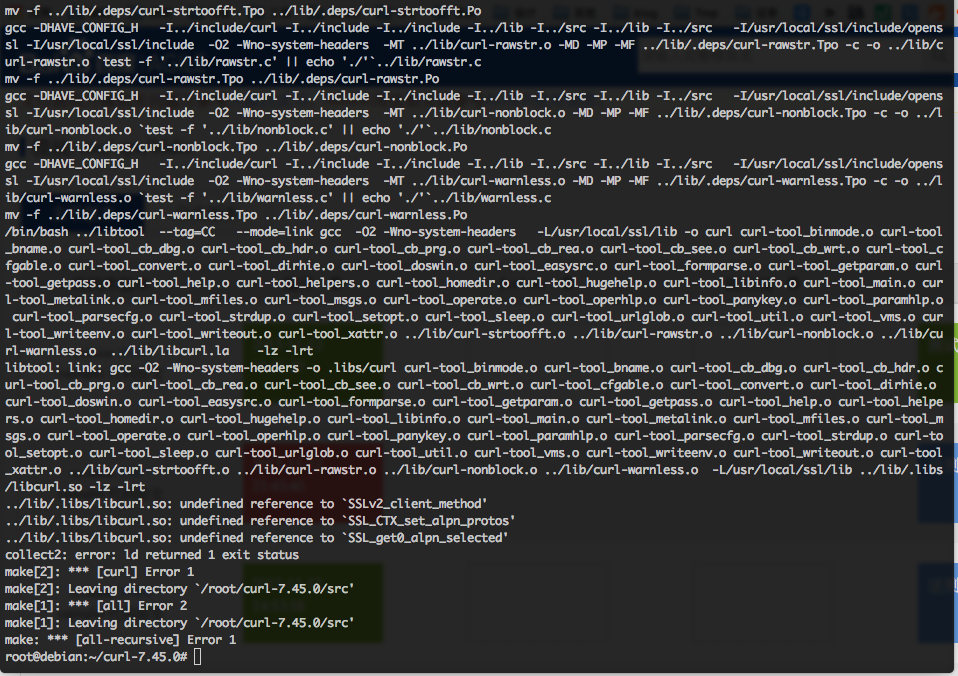
    图片描述

    openssl 也是编译的,参数如下

    ./config shared zlib 已经编译成功 root@debian:~/curl-7.45.0# openssl version OpenSSL 1.0.2d 9 Jul 2015 root@debian:~/curl-7.45.0# 
    45 条回复    2016-04-12 17:54:37 +08:00
    hardware
        1
    hardware  
       2015 年 11 月 12 日
    指定 openssl 的路径了吗
    yunhui
        2
    yunhui  
    OP
       2015 年 11 月 12 日
    @hardware ./configure --with-ssl 完了之后 ssl 已经是 enabled 状态了。也就是已经读取到了。
    yunhui
        3
    yunhui  
    OP
       2015 年 11 月 12 日
    ./configure --with-ssl=/usr/local/ssl 照样不行、
    feather12315
        4
    feather12315  
       2015 年 11 月 12 日 via Android
    能指定 ssl 源码文件吗?可以的话试试,别依赖系统库
    hardware
        5
    hardware  
       2015 年 11 月 12 日
    那还有种可能是你编译 openssl 的时候 sslv2 没开
    yunhui
        6
    yunhui  
    OP
       2015 年 11 月 12 日
    @feather12315 ./configure --with-ssl=~/openssl-OpenSSL_1_0_2d 似乎连 ssl 状态都是 no 了
    timonwong
        7
    timonwong  
       2015 年 11 月 12 日
    openssl 自己编译的,是不是全局安装了。
    你的情况可能是冲突:
    1. 全局安装了 openssl 的 library 和 headers
    2. curl 找到了 openssl ,用的是你自己安装的 header
    3. curl 链接时,使用的是系统自带的 openssl lib
    yunhui
        8
    yunhui  
    OP
       2015 年 11 月 12 日
    @hardware 如果是这样的华,我重新编译下 openssl
    yunhui
        9
    yunhui  
    OP
       2015 年 11 月 12 日
    @timonwong

    系统是最小化安装的,什么基础工具包都没有,我一步一路撸过来的, openssl 系统一开始都没有的,我自己编译的
    wbsdty331
        10
    wbsdty331  
       2015 年 11 月 12 日
    @timonwong 我也遇到这个问题了,原来是 debian 源里面装的 1.1 ,后来为了 nginx1.9.5 直接源码安装了 1.2 之后,每次编译 nginx 都要手动指定 openssl 源码库,不然就失败 不知道怎么搞
    yunhui
        11
    yunhui  
    OP
       2015 年 11 月 12 日
    @hardware 直接关了 sslv2 openssl 编译方法 ./config shared zlib no-ssl2 编译中
    wdlth
        12
    wdlth  
       2015 年 11 月 12 日
    1.0.2 废弃了部分东西,你可以用 1.0.1 编译,编译完不安装,直接指定路径编译 Curl 。

    https://www.openssl.org/news/changelog.html#x0
    wuruxu
        13
    wuruxu  
       2015 年 11 月 12 日
    感觉你最后在 link 的时候,没有加上 -lssl
    znoodl
        14
    znoodl  
       2015 年 11 月 12 日 via iPad
    @wbsdty331 我记得编译 nginx 所依赖的 openssl 是不需要编译的,而是指定 openssl 源码路径,和安装不安装 openssl 没有关系。

    好像以前的 nginx 版本需要编译 openssl ,你看下文档吧,记不太清了
    yunhui
        15
    yunhui  
    OP
       2015 年 11 月 12 日
    @hardware 直接关了 sslv2 openssl 编译方法 ./config shared zlib no-ssl2 编译 openssl
    ```
    echo "/usr/local/ssl/lib" >> /etc/ld.so.conf
    ldconfig -v
    ```
    然后然后~~~只是少了一行错误而已
    ```
    ../lib/.libs/libcurl.so: undefined reference to `SSL_CTX_set_alpn_protos'
    ../lib/.libs/libcurl.so: undefined reference to `SSL_get0_alpn_selected'
    collect2: error: ld returned 1 exit status
    make[2]: *** [curl] Error 1
    make[2]: Leaving directory `/root/curl-7.45.0/src'
    make[1]: *** [all] Error 2
    make[1]: Leaving directory `/root/curl-7.45.0/src'
    make: *** [all-recursive] Error 1
    ```
    yunhui
        16
    yunhui  
    OP
       2015 年 11 月 12 日
    @wdlth 一会试试 1.0.1
    wbsdty331
        17
    wbsdty331  
       2015 年 11 月 12 日
    @znoodl 我在编译 1.9.5 的时候没加 openssl 的路径 仍然报错
    yunhui
        18
    yunhui  
    OP
       2015 年 11 月 13 日
    @wdlth 果然好像少了 2 个错误
    ../lib/.libs/libcurl.so: undefined reference to `SSL_CTX_set_alpn_protos'
    ../lib/.libs/libcurl.so: undefined reference to `SSL_get0_alpn_selected'
    我重新试试
    yunhui
        19
    yunhui  
    OP
       2015 年 11 月 13 日
    @znoodl ./config shared zlib no-ssl2 使用这招 不编译 ssl2 就不会报../lib/.libs/libcurl.so: undefined reference to `SSLv2_client_method'这个错误, ssl2 不编译也没事吧,落伍的协议了
    hardware
        20
    hardware  
       2015 年 11 月 13 日
    @wdlth 编译完不安装 还不如直接在 curl 里屏蔽掉这个功能吧?
    hyq
        21
    hyq  
       2015 年 11 月 13 日
    你如果用的 centos ,静态库和动态库放的路径是 /usr/lib ,但是系统配置的库路径在 /usr/lib64 。不知道是不是这个原因
    hyq
        22
    hyq  
       2015 年 11 月 13 日
    刚才看漏了,是 debian 啊。。
    yunhui
        23
    yunhui  
    OP
       2015 年 11 月 13 日
    @hyq 要不我也顺便也看看是不是这个关系
    yunhui
        24
    yunhui  
    OP
       2015 年 11 月 13 日
    @yunhui 明显不是,哈哈
    msg7086
        25
    msg7086  
       2015 年 11 月 13 日
    https://packages.debian.org/stretch/curl

    dep: libcurl3-gnutls (= 7.45.0-1+b1)

    你看官方都用 gnutls 口味了。

    PS: 能不能给个编译 curl 的理由?
    yunhui
        26
    yunhui  
    OP
       2015 年 11 月 13 日
    @msg7086 呃呃呃,需求要 openssl~~~~
    abscon
        27
    abscon  
       2015 年 11 月 13 日 via iPhone
    我也想知道楼主为何要亲自编译 curl 。这比编译失败的原因要重要得多
    yunhui
        28
    yunhui  
    OP
       2015 年 11 月 13 日
    @abscon 主要是需要 openssl ,顺手撸了 curl , apt-get 的 curl 会自动下载 openssl
    abscon
        29
    abscon  
       2015 年 11 月 13 日
    @yunhui 我觉得这么常见的需求 debian 应该有现成的包提供,比如 libcurl4-openssl-dev ?
    yunhui
        30
    yunhui  
    OP
       2015 年 11 月 13 日
    @abscon 版本太低了。。
    wdlth
        31
    wdlth  
       2015 年 11 月 13 日
    @hardware 可以不安装库到系统里面,静态编译进程序就可以了。
    abscon
        32
    abscon  
       2015 年 11 月 13 日 via iPhone
    @yunhui 7.45 的版本,怎么就低了……
    你认为那个 4 是 curl 的版本?我觉得你最好花时间了解一下自己用的操作系统的包管理,否则很容易浪费时间。
    julyclyde
        33
    julyclyde  
       2015 年 11 月 13 日
    新人要先学基础,别那编译软件这种破事练手,浪费时间也学不到什么东西
    yunhui
        34
    yunhui  
    OP
       2015 年 11 月 13 日
    @abscon apt-get 的 curl 版本是 7.25 openssl 是 2013 年的
    yunhui
        35
    yunhui  
    OP
       2015 年 11 月 13 日
    @julyclyde 没招,必须编译, apt-get 的 openssl 是 2013 年的
    Felldeadbird
        36
    Felldeadbird  
       2015 年 11 月 13 日
    --with-ssl 要指明你的 openssl 编译地址。
    如:我的安装在 /opt/openssl 加上去就 OK 了。
    顺便吐槽一下这 CURL 和 OPENSSL 。 编译过程不能再当前目录进行,必须在别的目录。
    abscon
        37
    abscon  
       2015 年 11 月 13 日
    @yunhui “系统是最小化安装的,什么基础工具包都没有,我一步一路[-哔-]过来的, openssl 系统一开始都没有的,我自己编译的”
    ------------------------------------
    好吧,看到这里我明白了你的乐趣所在。别用 Debian 了,向你推荐 Gentoo 和 Linux From Scratch 。另外 FreeBSD ports 也不错的,你可以指定 curl 是用 GNU TLS , WolfSSL 还是 OpenSSL 。
    yunhui
        38
    yunhui  
    OP
       2015 年 11 月 13 日
    @abscon 其实主要是 apt-get 下载的 curl 会带上的 openssl1.01e 2013 版本太低了
    abscon
        39
    abscon  
       2015 年 11 月 13 日
    @yunhui 你用的 Debian wheezy ? 换 jessie 或者 stretch 或者 sid 都可以有更高的版本啊。

    比如 sid 的是 1.0.2d
    yunhui
        40
    yunhui  
    OP
       2015 年 11 月 13 日
    @abscon 现在的需求就是 debian7 这样,所以死这里了 唉
    Cu635
        41
    Cu635  
       2015 年 11 月 14 日
    lz ,讲一下你的需求,到底是自己折腾着玩才编译,还是说是哪个教程教的你编译安装,还是说自己需要官方源软件包没有的哪个特性,还是什么?

    另外,需求是 debian7 ,是公司要求的吗?还是说之前是 debian7 ,自己没有信心升级?还是说其它工具依赖?还是怎么?

    在服务器上, debian 最好使用最新的 stable 版本,这样问题很少。觉得 nginx 、 php 这些版本太低了的话可以加入 dot-deb 源。
    yunhui
        42
    yunhui  
    OP
       2015 年 11 月 14 日
    @Cu635 用的 debian7 仅仅是 mongodb 没写有 debian8 的版本,所以才选的,虽然我知道兴许是可行的,但是项目决定选 debian7 。然后抱歉,用的不是世界上最好的语言,用的是 nodejs~~~ 唉,当时纯粹就是想更新下 openssl 的版本, apt-get 下来的版本太低了是 1.0.1E 2013 的
    Cu635
        43
    Cu635  
       2015 年 11 月 15 日
    那你在 debian 7 上加入 debian-security 源和 dot-deb 源试一试。升级时候再看看 openssl 版本是否满足你的要求了。

    加的时候注意 google 一下,看看怎么配置需要的仓库。

    不过我还是很好奇,“项目决定选 debian7 ”是不是除了 mongodb 还有其它的工具依赖于老版本?

    如果只是 mongodb 的依赖的的话,考虑一下现在就做好升级预案, mongodb 将来不久肯定会加入对 debian8 的支持的。
    yunhui
        44
    yunhui  
    OP
       2015 年 11 月 15 日
    @Cu635 dot-deb 好像只是对 php nginx mysql 这类的支持较多。。。
    a6230589
        45
    a6230589  
       2016 年 4 月 12 日
    如果是 openssl 不是安装在默认目录,就会报这个错,原因是 make 的时候会进行执行测试,此时查找到的 so 文件不是自己安装的。可以在 configure 之前使用如下命令解决:
    export LDFLAGS="-Wl,-rpath=/path/to/openssl/lib"
    关于     帮助文档     自助推广系统     博客     API     FAQ     Solana     2766 人在线   最高记录 6679       Select Language
    创意工作者们的社区
    World is powered by solitude
    VERSION: 3.9.8.5 27ms UTC 14:50 PVG 22:50 LAX 06:50 JFK 09:50
    Do have faith in what you're doing.
    ubao msn snddm index pchome yahoo rakuten mypaper meadowduck bidyahoo youbao zxmzxm asda bnvcg cvbfg dfscv mmhjk xxddc yybgb zznbn ccubao uaitu acv GXCV ET GDG YH FG BCVB FJFH CBRE CBC GDG ET54 WRWR RWER WREW WRWER RWER SDG EW SF DSFSF fbbs ubao fhd dfg ewr dg df ewwr ewwr et ruyut utut dfg fgd gdfgt etg dfgt dfgd ert4 gd fgg wr 235 wer3 we vsdf sdf gdf ert xcv sdf rwer hfd dfg cvb rwf afb dfh jgh bmn lgh rty gfds cxv xcv xcs vdas fdf fgd cv sdf tert sdf sdf sdf sdf sdf sdf sdf sdf sdf sdf sdf sdf sdf sdf sdf sdf sdf sdf sdf sdf sdf sdf sdf sdf sdf sdf sdf sdf sdf sdf sdf sdf sdf sdf sdf sdf sdf sdf sdf sdf shasha9178 shasha9178 shasha9178 shasha9178 shasha9178 liflif2 liflif2 liflif2 liflif2 liflif2 liblib3 liblib3 liblib3 liblib3 liblib3 zhazha444 zhazha444 zhazha444 zhazha444 zhazha444 dende5 dende denden denden2 denden21 fenfen9 fenf619 fen619 fenfe9 fe619 sdf sdf sdf sdf sdf zhazh90 zhazh0 zhaa50 zha90 zh590 zho zhoz zhozh zhozho zhozho2 lislis lls95 lili95 lils5 liss9 sdf0ty987 sdft876 sdft9876 sdf09876 sd0t9876 sdf0ty98 sdf0976 sdf0ty986 sdf0ty96 sdf0t76 sdf0876 df0ty98 sf0t876 sd0ty76 sdy76 sdf76 sdf0t76 sdf0ty9 sdf0ty98 sdf0ty987 sdf0ty98 sdf6676 sdf876 sd876 sd876 sdf6 sdf6 sdf9876 sdf0t sdf06 sdf0ty9776 sdf0ty9776 sdf0ty76 sdf8876 sdf0t sd6 sdf06 s688876 sd688 sdf86
